此步骤允许在开始编程刀具路径之前准备加工环境。我们可以考虑4个主要操作:
-
毛坯创建
-
载入机床文件
-
载入材料文件
-
管理原点和设置
毛坯创建
Maybe the stock was already imported or created during automatic solid import; if not, once we go from Design to Machining menu, we get into the definition of the stock shape. Click here for more details: 毛坯创建 .
机床文件
|
车间中的机床是数控控制器与具有特定机械特性和已安装刀具的机床相结合的设备。这正是机床文件中所定义的。 In most cases, the machine file is not obligatory to generate the iso program, but it is greatly advised to define it. Click here for more details: 机床文件 |
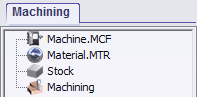
|
您可以在 刀具/选项/加工 中定义默认的机床文件。每次打开GO2cam时都会自动加载此机床。
材料文件
选择材料文件意味着加载 切削条件表 与您的刀具相关联。
您可以使用默认的材料文件,或者在特定编辑器中创建并保存自己的表格。
这两个阶段可以通过 加工历程树 获得,通过 右键单击 .
Click here for more details: 材料文件
管理原点和设置
默认情况下,程序原点是参考平面的原点。
If you want to define the origins differently, two cases are explained here: 管理原点和设置
1- 如何更改PO(程序原点)?
2- 如何为操作声明G54/G55/Gxx平面?
在此页面,我们还描述了如何对工件进行翻转编程。