介紹

|
This command enables to create profiles for 4 axis machining by clicking the faces of the solid. 點擊起始面和結束面,然後點擊起始點。將創建一個新的圖素「雙輪廓」,該圖素稍後在創建螺紋點時會被識別。 |

|
面識別性能提升 實體上的 4 軸 透過改進的識別演算法,能更好地接受複雜形狀。 |
使用方法

|
|
|
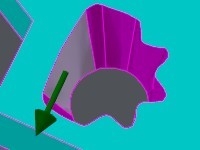
點擊起始面。 箭頭顯示加工方向。 您可以點擊箭頭反轉方向。 |
|
|
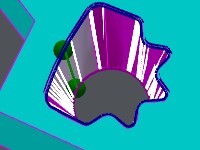
點擊結束面;如果點擊相同面,輪廓將會閉合。 將顯示輪廓的預覽,您可以看到高輪廓和低輪廓之間的同步點。 |
|
|
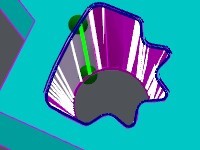
您可以更改輪廓的起始/結束面: [1] Automatic selection: if you click this icon, GO2cam selects the best face for the starting face. [2] Manual selection: you can click any face of the solid profile. 您也可以移動起始點和/或結束點: 只需點擊綠色圖素並沿面移動。將其拖放到正確的位置。 |
|
|
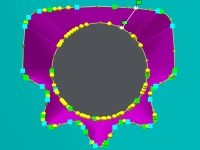
Validate with [4] or cancel with [3] . 驗證後,輪廓即被創建。在此情況下,我們創建一種新型圖素:「雙輪廓」。 |
|
|
|
|
備註:
-
雙輪廓將由「自動螺紋點」自動識別,
-
稍後,您可以使用上下文彈出視窗(右鍵點擊輪廓)編輯和修改輪廓。
-
加工選擇變得更加容易:只需點擊雙輪廓一次!