 |
GO2cam Pascal API
|
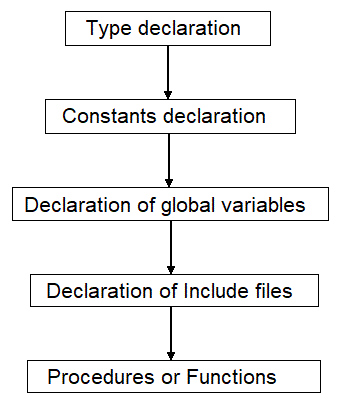
This part is intended to define non-standard data types.
These types are defined by an identifier, which can be considered a new type in the rest of the program.
RECORD structures are defined in the type declaration.
sets the NUMBER type to take 10 values (0 to 9).
This part allows you to define identifiers that have a constant value throughout the entire execution of the program. The identified constant can't be modified during the program.
This part allows you to define variables that will be used and active during all the program. A variable has to be declared and defined by the type of data it represents. In Pascal, types can be scalar, structured or non-standard.
Scalar type defines a set of ordered values. There are 4 different types of variables: Integer, Boolean, Real and String.
Int_variable = Integer - Type of variable that can take only integer values.
Bool_variable = Boolean - Type also called logical type. Value representing a logical truth, for example TRUE or FALSE.
Real_variable = Real - Type of variable that can take only real values.
Str_variable = String - Type of variable that can take only alphanumerical values. The Character variable can be only one : a letter or a number.
To define variables containing chain of characters, we have to use arrays.
A structured type defines a structuring method. This is done in an array. In an array table structure, all elements have the same type. An element of the array is referenced by an integer index.
TAB = The variable named TAB defines an array of Integers (INTEGER) that can contain 16 elements (0 to 15).
TEXT = The variable named TEXT is an array of Characters (CHAR) that can contain 31 elements (0 to 30). This type of array allows working on strings.
These types can be defined by the user. This declaration is always done at the beginning of the program.
VALUE = Defines the type VALUE to be able to take 10 values (0 to 9).
TABLE_REAL = Defines the type TABLE_REAL to be an array of 16 reals.
Value_example = variable of type VALUE that can only take a value defined in the set VALUE, that means 0 to 9.
Table_example = variable of type TABLE_REAL. This variable is defined as an array of 16 real elements.
include files are pascal files that contains at least one Procedure or Function. This avoid to write the same procedure or function multiple times in programs where they are necessary.
Procedures or Functions that are in an include file can be then used by every program and at any time during the program.
For this, we just need to define the include file that will be used. The call of include files is done like this:
~/ allows you to search the include file inside the current directory. This is the directory where the program will be running. If the Include file is not inside the current directory, you need to specify the path where the file is located on the hard disk.
Example.INC = name of include file. Search.PAS = name of include file.
A set of instructions can be identified by a name. This set is then called a procedure.
A procedure is a sequence of instructions that performs processing. It must be identified by a declaration, and can only be used insofar as it is characterized by a certain number of parameters representing the data necessary for the processing carried out.
A procedure can also contain local variables which are not known to the other procedures making up the program.
If a procedure is characterized by a single result, it can be considered as a function. This function can then be used in an expression.
The complete structure of a program has the following syntax :
Every Pascal file from a standard PP will have an header with the following information, comments and copyright.
When you program a specific PP, we advise you to provide as much information as possible in the header of this specific PP. This information will be helpful when people exchange PPs or collaborate on one.
For example:
The difference between a procedure and a function is that the procedure allows you to treat and return more values, when the function can treat more values but returns only one parameter.
A function in Pascal is exactly like a mathematical function. It receives (input) different type of variables and returns (output) only one.
For example:
f(x) = x²
This simple function returns the square of x and can be defined in Pascal like this :
FUNCTION is declaring the function. squarefct is the name of this function and also the name of the variable that holds the output from this operation. (x : REAL) The parentheses must contain all variables required by this function. In this example only one variable is used (x)
REAL gives the type of value returned by the function inside the squarefct variable. Here it will be a real value.
Program using the squarefct function :
The parameter Real_variable is given to the function through a real value (input). In the function definition, this is a formal parameter that will be replaced by the actual value when the function is called. The result is given back (output) inside the function name : squarefct.
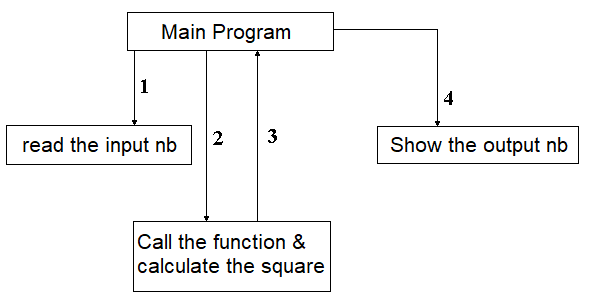
1 : read the input value inside the main program (real_ZStep).
2 : call the function squarefct and calculate the square of the input value.
3 : Back to main program with the variable squarefct = square of real_ZStep.
4 : display in debug the real_result.
For example:
f(x) = 5a2 + 6b - 5c + 10
This function is defined in pascal like this :
FUNCTION is declaring the function.
polynomial is the name of the function and as well the name of the variable that will receive the result of the calculation.
(a,b,c : REAL) The parentheses must contain all variables required by this function. Here variables used (a,b and c).
REAL gives the type of value returned by the function inside the polynomial variable. Here it will be a real value.
Program using the polynomial function :
The parameters a,b and c are given to the function through real values (input). In the function definition, these are formal parameters that will be replaced by the actual values (Real_1, Real_2, Real_3) when the function is called. The result is given back (output) inside the function name : polynomial.
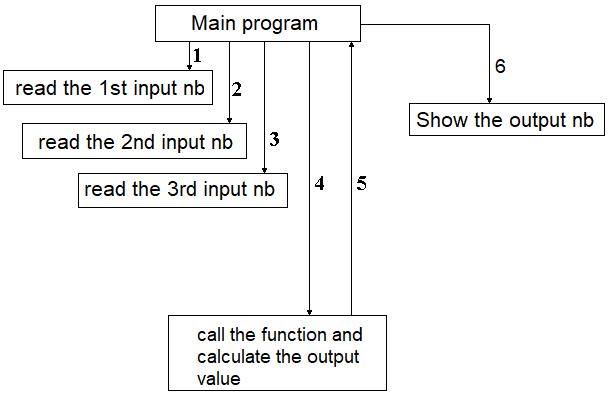
1 : read the input value inside the main program (real_1 ).
2 : read the input value inside the main program (real_2 ).
3 : read the input value inside the main program (real_3 ).
4 : call the function polynomial and calculate the result.
5 : Back to main program with the variable polynomial.
6 : display in debug the real_result.
Unlike a function, a procedure performs processing and can return multiple output values to the main program.
PROCEDURE declare the procedure.
example is the name of this procedure.
(...) The parentheses define all variables used by the procedure.
The variables of a procedure can be defined in three ways :
1 : input variables.
These variables must be initialized before the procedure is called.
When declaring the procedure, do not put VAR in front of the variable.
In the procedure example , Int_1 is an input variable (INTEGER).
2 : input & output variables.
These variables has to be initialized in the main program before the call of the procedure.
By declaring the procedure we have to put VAR in front of the variable. These variables will be modified during the processing and will modify the values in the main program.
In the procedure example , Real_2 and Int_2 can be input & output variables (REAL).
3 : output variables.
These variables are not initialized in the main program.
By declaring the procedure, we have to put VAR in front of the variables. During the processing of the procedure, these variables will be assigned a value that will be returned to the main program. In the procedure example, Real_2 and Int_2 can be output variables (REAL).
For example, a procedure that calculates two mathematical functions : f(x) = 4x + 5 and g(t) = 6t + 8.
PROCEDURE declares the procedure.
calculation_example is the name of the procedure.
(...) inside the parentheses, the variables are declared.
x,t are input variables (REAL).
fx,gt are output variables (REAL).
Program calling the procedure calculation_example :
The variables real_result1 and real_result2 are output variables because they are not initalized before the procedure call.
The parameters x, t, fx, and gt are given to the procedure as real values.
In the procedure definition, they are formal parameters that will be replaced by real values Real_1, Real_2, real_result1 and real_result2 during the procedure call.
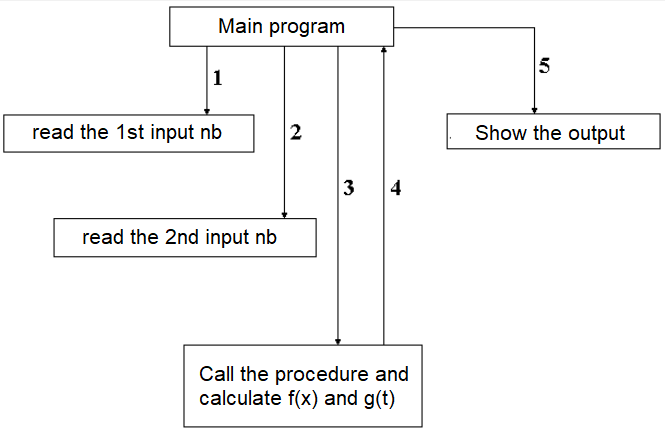
1 : read the input value inside the main program (Real_1 ).
2 : read the input value inside the main program (Real_2 ).
4 : call the procedure calculation_example and calculate the 2 results.
5 : Back to main program with the variables real_result1 and real_result2.
6 : display in debug the real_result1 and real_result2.
It is possible to define new types with the GO2cam Pascal interpreter, according to the programming needs.
The GO2cam Pascal interpreter offers different pre defined types. These types are listed in the RES_*.DAT files.
These types are used by declaring the variables inside the procedures.
The PI constant is already defined inside the GO2cam Pascal Interpreter, so it is not necessary to redefine it in programs where it is used.
To use it, you just need to proceed like following :
These are specific functions. They allow you to communicate between the Interpreter Pascal and GO2cam.
These communications are necessary for creating cycles with a process, or during cycle processing by the post-processors to generate NC codes.
PCALL, ICALL et RCALL
These 3 functions are used by processes or Post-Processors. According to the program generated (process or PP), the libraries used are different.
PCALL : call a procedure in the related library.
ICALL : call a function in the related library and give back an Integer value.
RCALL : call a function in the related library and give back a real value.
PUTIL : This function is used by processes or Post-Processors and use only one library.
This library contains different tools that can manage memory allocation and / or output some program during execution.
The GO2cam Interpreter allows you to store values in global variables. These functions are the only way to recover values between the calls of the interpreter.
For processes, the values put in global variables are lost if processes are loaded one by one. However, values are retained when using multi-processes.
These global variables are defined for integer values, real values and strings. The variables stored in these global arrays are:
Array of global integers : [0..200] Array of global reals : [0..200] Array of global strings : [0..40] {This array can store 20 strings of 80 characters each}
Six functions to access to these global variables are available. Three to write and three to read.
Writing functions : INTWR, DOUBLEWR and STRINGWR
INTWR(index,variable); Writes an integer in the array.
DOUBLEWR(index,variable); Writes a real in the array.
STRINGWR(index,chaine); Writes a string in the array.
Reading functions : INTRD, DOUBLERD and STRINGRD
INTRD(index,variable); Read an integer in the array.
DOUBLERD(index,variable); Read a real in the array.
STRINGRD(index,chaine); Read a string in the array.
The commands BEGIN and END represents the main loop for procedures writen with the interpreter.
A procedure always starts with BEGIN and always ends with END.
These delimiters can also be used within other loops containing multiple instructions.
This loop allows you to repeat a list of instructions n times. The number of iterations is known in advance.
If we use FOR TO, the repetition will be incremental.
Example FOR TO
If we use FOR DOWNTO, the repetition will be decremental. Example FOR DOWNTO
The FOR TO and FOR DOWNTO commands execute only a single statement per iteration.
If more operations are needed, you have to use the commands BEGIN and END.
Example : loop with more instructions
The command WHILE DO allows you to repeat an instruction as long as the loop condition remains true.
Attention, a bad use of this command can generate an infinite loop.
Most of the time, this command is used together with the BEGIN and END commands.
Attention, the loop condition must evaluate to false at some point in order to exit.
In this loop, when Int_2 will take the value 5, Int_1 will take the value 20 and the reference will be false. The loop will end.
This command allows you to repeat a list of instructions until the condition to stop is true.
Beware of infinite loops.
The command IF THEN ELSE executes instructions when the condition is true or to do others if the reference is false.
The command ELSE is optional.
To execute more instructions, you need to use the commands BEGIN and END.
By using BEGIN and END together with ELSE, we don't write ; after the END that is just before the ELSE.
The command CASE OF OTHERWISE executes instructions case by case based on the value of the variable.
The command OTHERWISE is optional.
The OTHERWISE block is executed only when none of the CASE values match.
The command write writes output to the display.
It is possible to write a string, the value of a variable or to combine both by separating them with commas.
A string has to be contained between two primes ('...').
Accents are not taken into account by the commands write and writeln. If you use them, graphical mistakes will be shown.
The command writeln is similar to the command write.
The difference is only that a line jump will be done after showing the informations.
The function arctan allows you to calculate the arctangent of a numerical value real or integer.
The angle must be in radians.
The function exp calculates the exponential of a numerical value real or integer.
The function ln allows you to calculate the neperian logarithm of a numerical value real or integer.
The function sin allows you to calculate the sine of a numerical value real or integer.
The angle must be in radians.
The function cos allows you to calculate the cosine of a numerical value real or integer.
The angle must be in radians.
The function sqrt allows you to calculate the square root of a numerical value real or integer.
The function sqr allows you to calculate the square of a numerical value real or integer.
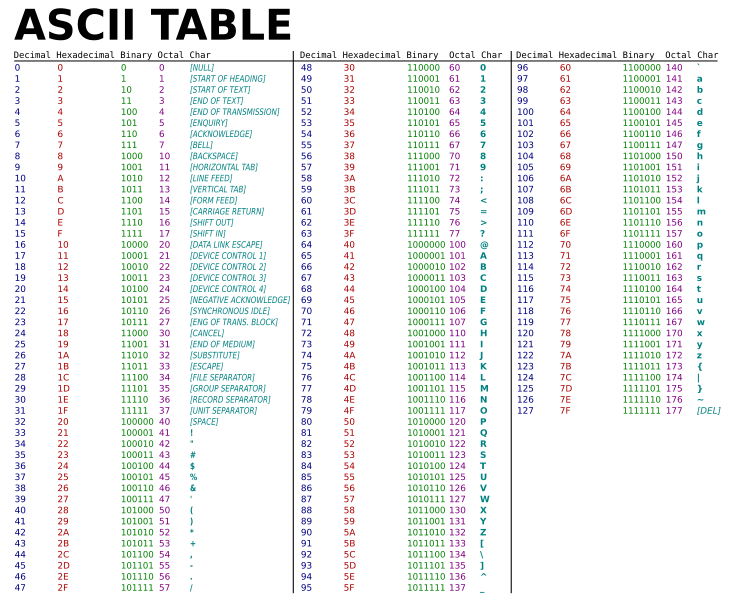
The function chr assigns an ASCII character to a variable based on its code.
The ASCII code must be an integer.
This function ord returns the ordinal position of an element in a list, or the numeric code of an ASCII character.
Example : recover an order number from a list
list = (monday,tuesday,wednesday,thursday,friday,saturday,sunday)
ord(wednesday) = 3
Example : recover the ASCII decimal number of a character
ord('C') = Character number of C = 67.
The function odd is a boolean function. It returns FALSE if the value is even, and TRUE if odd.
writeln(odd(34)); will show on the screen FALSE.
writeln(odd(35)); will show on the screen TRUE.
This function pred returns the predecessor of an element in a list, or the previous ASCII character code.
Example : recover the previous order number from a list
list = (monday,tuesday,wednesday,thursday,friday,saturday,sunday)
pred(wednesday) = 2
Example : recover the previous ASCII decimal number of a character
pred('C') = character number of C - 1 = 66
This function succ allows you to recover the next order number from an element of a list, or to recover the next number of an ASCII character.
Example : recover the next order number from a list
list = (monday,tuesday,wednesday,thursday,friday,saturday,sunday)
succ(wednesday) = 4
Example : recover the next ASCII decimal number of a character
succ('C') = character number of C + 1 = 68
The function abs allows you to recover the absolute value of a real or integer.
Int_1 will show -45 and int_2 will show 45.
The function round allows you to round a real value to the closest integer.
real_1 will show 45.214 and int_1 will show 45.
real_1 will show 45.914 and int_1 will show 46.
The function trunc allows you to recover the integer part of a real value.
real_1 will show 45.914 and int_1 will show 45 (and not 46 like round would have done)
When a Pascal program requires an empty string, the string must be initialized before use.
If not initialized, the interpreter will give an error message. To initialize a string to null, you just need to affect the null character to the first position of the array of this string.
The character 0 (chr(0)), or character null, is put at array 0 of the string.
This string is now initialized and can be used for any processing.
The function strcat appends a string to the end of another.
The string str_target will give Hello World !
The function strcmp compares two strings.
Returns 0 if the strings are identical, or 1 if different.
The function strcpy copies one string into another.
The string str_target will contain 'Hello World !'
The function strlen allows you to know the length of a string.
The string length Int_1 will be 5
The function str_trim removes leading and trailing spaces from a string.
The string Str_target will be 'Hello' without leading or trailing spaces.
The function str_pos searches for a substring within another string.
It returns the index where the searched substring begins.
If the searched part of string is not found inside the target string, index returned will be -1.
str_pos(string to search, string where to search , start index for searching);
The function str_ftoa converts a real value to a string.
str_ftoa(str_target,real_value,int_digit,int_decimal);
The function str_atof converts a string to a real value.
str_atof(str_origin,real_target);
The function str_itoa converts an integer to a string.
str_itoa(str_target,int_origin);
The function str_atoi converts a string to an integer.
str_atoi(str_origin,int_target);
The function str_range extracts a substring from another string between two indexes.
str_range(str_output,str_input,int_start,int_end);
The function str_upr converts a string to uppercase.
str_upr(str_target);
The function str_lwr converts a string to lowercase.
str_lwr(str_target);
A sequential file is a text file that contains information saved from a program and that can be recovered in the same program or in another one.
The stored information is stacked sequentially. To read any information, we need then to read all information stacked in the file. The instructions allowing to treat sequential files are the following :
FILEOPENRD : Open a file in reading mode.
FILEOPENWR : Open a file in writing mode.
FILECLOSE : Close a file.
FILERD : Read information in an opened file.
FILEWR : Write information in an opened file.
The creation of a sequential file consists of opening the file on writing mode, write informations inside then close the file.
The variables Str_1, Str_2 and Str_3 contain the information to copy inside the sequential file.
The variable str_name contains the place and the name of the file to create. In this example, the file test.txt will be created in the directory tmp on the hardisk C.
The variables Int_1 and Int_2 are used to test the opening of the file and the writing in the file.
The file test.txt contains also :
Reading a sequential file consists of opening the file in reading mode, then reading the information that are stored inside and finally closing the file.
The variables Str_1, Str_2 and Str_3 are initialized at program begin. These variables will receive the information that will be taken from the sequential file.
The variable Str_name contains the place and the name of the file to read. In this example, the file test.txt will be read in the directory tmp on the hardisk C.
The variables Int_1 et Int_2 are used to test the opening of the file and the reading in the file. If the file test.txt is found in the directory, the variable Int_1 takes then the value 0 and the reading of information will follow. But if the file is not found, the variable Int_1 will take the value 1 and the reading of the file will not succeed. Note that FILECLOSE must still be called even if the file was not found, since the file handle was allocated by FILEOPENRD.
A record is a highly structured data type in Pascal. They are widely used in Pascal, to group data items together logically.
While simple data structures such as arrays or sets consist of elements all of the same type, a record can consist of a number of elements of different types, and can take on a huge complexity.
Each separate part of a record is referred to as a field.
In Pascal , a record type can be defined by a declaration, but is not necessarily linked to a file. It is used to group different kinds of data under a generic name. A record is defined by different types of data called fields. These fields can be alphabetical, alphanumeric, numerical, or scalar
A point can be decomposed in 2 different fields:
Program structure with a record :
1 - declare a new type
2 - declare a variable (pt) from the requested type (point)
3 - Using this variable
Example : definition of a point with coordinate X for absciss and Y for ordinate :
 1.10.0